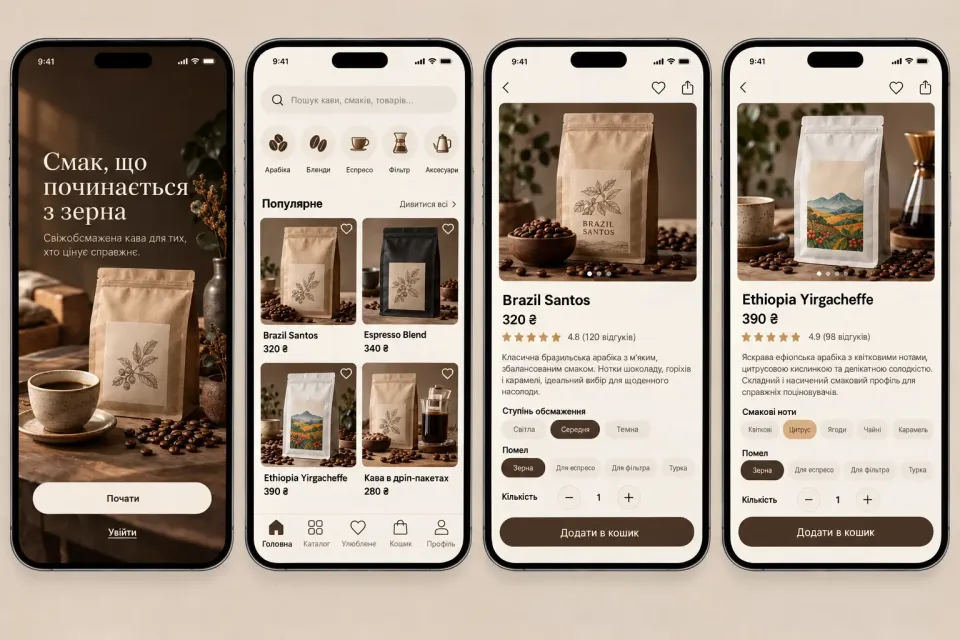
Bean coffee is a product people want to choose carefully. Customers need to understand the origin, roast level, tasting notes, pack size, and delivery options. A mobile app for a roasting company can turn that decision into a short, clear journey from discovering a coffee to placing a repeat order.
What a mobile coffee shop should solve
The app brings the catalog, guidance, and checkout into one focused environment. A customer opens the shop, sees the current selection, filters it by roast or brewing method, reads the product details, and chooses the right size. This is especially useful for returning customers who already know what they like and do not want to repeat a long website journey every time.
At the same time, the first screen should not become an encyclopedia. Good information architecture explains the difference between single origin, blends, and decaf in plain language, while leaving deeper details for the product page.
Two essential screens
Catalog
The catalog can show the coffee name, origin, roast level, short tasting profile, and price. Filters can cover country, flavor profile, roast, bean format, and recommended brewing method. Product cards should stay compact so customers can compare several options without opening every item.
Product detail
The detail screen provides the information that supports a decision: pack photography, tasting notes, altitude, roast date, available sizes, and a brewing suggestion. Size and quantity controls should sit close to the primary “Add to cart” action so the customer does not have to scroll back to the top.
Features that create real value
- Search and filters. Customers can find coffee by flavor, origin, roast, or format.
- Reordering. Purchase history and saved products shorten the path for returning customers.
- Subscriptions. A recurring delivery interval helps customers keep fresh coffee at home.
- Order status. Push notifications can cover confirmation, roasting, handoff to the carrier, and delivery.
- Loyalty. Rewards, relevant offers, and recommendations can work without aggressive banners.
A cream, espresso, and terracotta visual system
A warm palette fits a specialty coffee store: a cream background reduces visual noise, espresso brown communicates craft and quality, while caramel or terracotta accents highlight buttons and active states. The interface should not rely on dark brown everywhere; text and navigation still need strong contrast and comfortable reading.
Photography of beans and packaging should be the main visual material. It can be supported by simple icons, generous spacing, and consistent typography. The result feels tactile and premium while remaining a practical e-commerce experience.
React Native for iOS and Android
React Native provides a shared product foundation for iPhone and Android while leaving room to adapt platform-specific flows. Catalog, cart, authentication, profile, and order status can use shared components, while payments and system integrations can use native modules where appropriate.
The app connects to the store API: products and stock come from the server system, orders are passed to accounting or CRM tools, and notifications are delivered through Apple Push Notification service and Firebase Cloud Messaging. Analytics should cover product views, filter usage, add-to-cart events, checkout starts, and repeat purchases.
How customers download and use it
The app can be distributed through the App Store and Google Play. After installation, customers can browse without mandatory registration and create an account at checkout or when they want to save order history. This lowers the barrier to first use while giving the business permission to send personal updates only when they are relevant.
The value of this product is not simply having a mobile version of an online store. It appears when the path from wanting a particular coffee to placing a repeat order becomes shorter, clearer, and more enjoyable. That is why design, catalog, logistics, payments, and communication should be planned as one connected product system.