Writing a Mobile App Specification: Structure, Examples and Common Gaps
A mobile app specification is rarely bad as a whole. It usually covers what the founder sees every day: screens, buttons, colours. And it says almost nothing about what actually consumes the budget: error states, roles and permissions, offline behaviour, the admin panel, data migration, App Store and Google Play requirements. That is why two studios can quote three-fold different figures for the same document, and both are technically right.
This article walks through a specification structure that lets a team estimate a project within ±20–30%, rather than "somewhere between three and nine months". You will find a section template, wording examples, a table of common gaps and a checklist to run before sending the document to vendors.
Why write a spec if you work in Agile
The usual objection: "We run Scrum, requirements will change anyway." They will, but a spec is not a contract for every button. It is a shared model of the product that answers three questions: what we are building, for whom, and how we will know a feature is done. Agile removes the illusion that everything can be predicted up front, not the need to agree on boundaries.
In our projects the pattern is consistent: the less is defined at the start, the wider the estimate range and the more clarification happens mid-development, when every open question blocks the designer, the backend and the mobile developers at once.
The international standard ISO/IEC/IEEE 29148 defines what makes a requirement good: unambiguous, verifiable, feasible and traceable. A mobile startup does not need a 200-page standard-compliant document, but every line of the spec should pass those four tests.
Spec structure: nine sections you actually need
This is the structure we recommend for MVPs and mid-complexity apps. Such a document is typically 15–40 pages including user flows, excluding design mockups.
- Context and goals. The problem, the audience, the business model and 2–3 success metrics (for example, the share of users who complete a first purchase). Plus an explicit list of what is out of scope for version one.
- User roles and permissions. Guest, registered user, premium, moderator, admin. A "role × action" matrix answers half of the backend questions.
- Functional requirements. User stories with acceptance criteria, grouped by module (sign-up, catalogue, cart, profile).
- User flows and screen map. Transitions between screens, including what happens after a push notification, a deep link or a returning login.
- States and edge cases. Empty lists, network errors, denied camera access, expired sessions.
- Non-functional requirements. Platforms and minimum OS versions, performance, offline, localisation, accessibility, security.
- Integrations. Payments, maps, analytics, CRM, push provider, external APIs: who provides access, whether a sandbox exists, rate limits.
- Admin panel and content. Who manages data, moderates and responds to users, and how.
- Store and legal requirements. Privacy policy, account deletion, age ratings, subscriptions.
Writing functional requirements that can be estimated
User story plus acceptance criteria
The "As a [role], I want [action], so that [value]" format is useful not for its own sake but because it forces you to name the role and the goal. A good story meets the INVEST criteria: independent, negotiable, valuable, estimable, small and testable. If a story cannot be estimated, it is either too big or too vague.
Attach acceptance criteria to every story in Given / When / Then form. Compare:
Weak: "The user can reset their password."
Strong: "Given the user is on the sign-in screen and has entered an existing e-mail, when they tap 'Forgot password?', then within 1 minute they receive an e-mail with a link valid for 30 minutes; the link opens the app if installed, otherwise a web page; after the password is changed, all other sessions are signed out."
The second version immediately settles deep links, token lifetime and session invalidation: three separate tasks that the first version would have turned into surprises.
MoSCoW prioritisation
Label every requirement Must, Should, Could or Won't (this time). A practical rule: if Must covers more than 60% of the scope, there is no real prioritisation. The Won't list matters just as much: it records what you deliberately dropped and stops those topics from resurfacing every sprint.
Non-functional requirements: where half the budget hides
"The app must be fast and stable" is not a requirement because it cannot be verified. State each non-functional requirement with a number and a way to measure it.
| Category | Vague wording | Verifiable wording |
|---|---|---|
| Platforms | iOS and Android | iOS 17+ and Android 9+ (API 28); phones, tablets without a dedicated layout |
| Performance | Fast launch | Cold start to the home screen ≤ 2 s on a mid-range reference device |
| Stability | No crashes | Crash-free users ≥ 99.5%; within Android vitals thresholds (1.09% user-perceived crash rate, 0.47% ANR) |
| Offline | Works without internet | Last 50 orders and form drafts available offline; sync after reconnect |
| Localisation | Multiple languages | UK and EN at launch; strings in resources; locale-aware dates and currency |
| Accessibility | Usable by everyone | Dynamic Type, VoiceOver/TalkBack, text contrast per WCAG 2.2 AA (4.5:1) |
| Security | Data is protected | Tokens in Keychain / Android Keystore, TLS 1.2+, MASVS-L1 controls |
Google uses the Android vitals thresholds for an app's visibility on Google Play, so they are a product risk rather than a wish. The 4.5:1 contrast ratio for body text comes from WCAG 2.2, and OWASP MASVS is a convenient baseline for security controls.
Store requirements to include from day one
Some requirements are not up to you but still change the scope. If they are missing from the spec, they will appear right before the first release.
- Account deletion. If users can create an account, Apple requires that they can initiate its deletion inside the app (App Review Guidelines, 5.1.1(v)), and Google Play requires it both in the app and via a web link (Google Play policy). That means a separate flow, screen and backend logic.
- Third-party sign-in. If you offer Google or Facebook login, check guideline 4.8 on providing an alternative privacy-focused login option.
- Target API. Since 31 August 2026, new apps and updates on Google Play must target Android 16 (API 36) (Android Developers). This applies to every third-party SDK you ship as well.
- Privacy manifest. Apple requires a privacy manifest for the app and commonly used third-party SDKs, plus the privacy "nutrition label" in App Store Connect; Google Play has the Data safety section.
- Closed testing. New personal Google Play developer accounts must run a closed test with at least 12 testers for 14 consecutive days before they can apply for production access (Play Console Help). Put those two weeks in the plan.
- Digital goods. Subscriptions and feature unlocks generally must be sold through In-App Purchase / Google Play Billing, which affects both unit economics and the backend.
Common spec gaps and what they cost
These are the items we most often add together with the client during discovery. Effort figures are our studio's experience for a mid-complexity app on two platforms; your numbers may differ.
| Gap | What is usually missing | Typical extra scope |
|---|---|---|
| Screen states | Loading, empty, error, partially loaded data | +10–20% to design and UI work |
| Admin panel | Who edits content, moderates, sees orders | 80 to 300+ hours on its own |
| Roles and permissions | What guests see, role changes, multiple accounts | +5–15% backend |
| Push and deep links | Which events, where a tap leads, signed-out users | 40–120 hours |
| Offline and sync | Data conflicts, action queue, retries | Can double a module's scope |
| Data migration | Moving users from a legacy system or website | 24 hours to several weeks |
| Analytics | Event plan, funnels, access | 16–60 hours plus discipline in every task |
| Legal | Consents, account deletion, age restrictions | 20–60 hours |
Step by step: from idea to spec in 2–4 weeks
- Week 1: goals and boundaries. Define the problem, segment, business model and success metrics. Write the Won't list. If the idea is still unproven, start with idea validation.
- Weeks 1–2: roles and scenarios. Describe 3–7 key scenarios from first launch to the target action. Sketch a user flow for each, even on paper.
- Week 2: stories and criteria. Break scenarios into stories, add acceptance criteria and MoSCoW priorities.
- Weeks 2–3: non-functional requirements and integrations. Fill in the table with numbers; list external services and who owns each account.
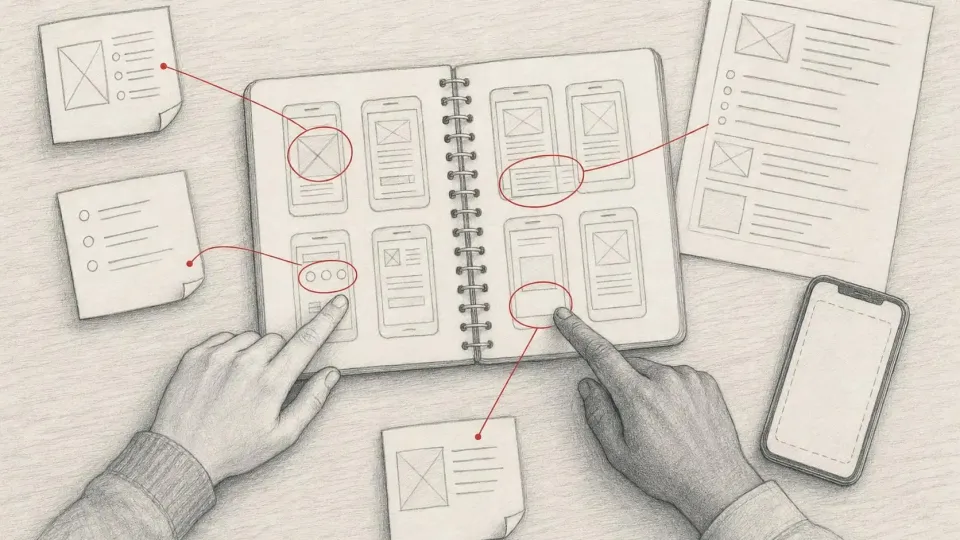
- Week 3: prototype. A clickable Figma wireframe for the key scenarios. Show it to five users: according to Nielsen Norman Group, five sessions uncover most usability problems.
- Weeks 3–4: technical review. A developer and a QA engineer go through the document and ask questions. Each question becomes either a spec clarification or an explicit assumption in the estimate.
Typical mistakes
- Design instead of requirements. Polished mockups without logic: what happens when a payment fails, how many times an SMS code can be re-sent.
- No document owner. When five people edit the spec without history, nobody knows which version is current. Keep a changelog and version the document.
- Technical decisions from non-technical authors. "Use MongoDB and microservices" in an MVP spec usually just constrains the team. Describe requirements and leave solutions to the architect unless there is a strong reason.
- "Etc." and "and so on". Every such phrase is unestimable scope. Replace it with a closed list.
- Silence about post-release. Who handles support, updates for new OS versions and crash monitoring.
Checklist before sending the spec to vendors
| Check | Done when |
|---|---|
| Goals | Problem, audience and 2–3 measurable success metrics are stated |
| Boundaries | There is a Won't list for version one |
| Roles | A role × action matrix covers all user types, including admin |
| Stories | Each has acceptance criteria and a MoSCoW priority |
| States | Loading, empty and error states are described for key screens |
| Non-functional | Each requirement has a number and a verification method |
| Integrations | List of services, access owner, sandbox availability |
| Stores | Account deletion, privacy, IAP, target API, closed testing |
| Glossary | Key terms are defined and used consistently |
| Version | Version number, date, author, changelog |
With 8 of 10 items done, you will get comparable estimates from different teams and can discuss approach instead of guessing who meant what. With fewer than half, it is more honest to commission a paid discovery phase: 2–4 weeks of work by an analyst, a designer and a tech lead that produces the spec and the estimate as its output.
Sources: ISO/IEC/IEEE 29148:2018; Apple App Review Guidelines; Google Play: account deletion requirements; Android Developers: target API level; Play Console: testing requirements for new personal accounts; Android vitals; Apple: privacy manifest files; W3C WCAG 2.2; OWASP MASVS; Bill Wake: INVEST; Cucumber: Gherkin reference; NN/g: Why You Only Need to Test with 5 Users.